

Office No.104, Sahakar Niwas, Plot No.160/161, Rd no.2, Jawahar Nagar, Goregaon(West), Mumbai-400062
Office No.104, Sahakar Niwas, Plot No.160/161, Rd no.2, Jawahar Nagar, Goregaon(West), Mumbai-400062
 14 Comment
Summer temperatures can be unforgiving—not just for people, but also for batteries that power your critical equipment. Whether you rely on a UPS for your data center, an inverter for your home or office, or an industrial UPS system for manufacturing operations, excessive heat is one of the biggest threats to battery performance and longevity.
Many users notice reduced battery backup during summer but don't realize that prolonged exposure to high temperatures can permanently damage batteries, shorten their lifespan, and even lead to unexpected failures during power outages. This is particularly concerning for businesses where uninterrupted power is essential for protecting equipment, maintaining productivity, and preventing costly downtime.
The good news is that proper maintenance and a few preventive measures can significantly improve battery performance in hot weather. By understanding how temperature affects batteries and following industry best practices, you can extend battery life, improve backup time, reduce maintenance costs, and ensure reliable operation throughout the year.
In this comprehensive guide, you'll learn why heat damages batteries, the ideal operating temperature for different battery types, warning signs of overheating, and expert-approved tips to maximize the lifespan of your UPS and inverter batteries.
Heat is the silent enemy of every battery. While batteries require chemical reactions to store and deliver electrical energy, high temperatures accelerate these reactions beyond their optimal rate. Initially, batteries may appear to perform better in warm conditions because chemical activity increases. However, this temporary improvement comes at the expense of long-term battery health.
For every increase of approximately 10°C above the recommended operating temperature, the aging rate of many sealed lead-acid (VRLA) batteries can nearly double. As internal temperatures rise, water loss increases, corrosion accelerates, and battery components deteriorate more quickly.
Faster Chemical Degradation
Excessive heat speeds up the chemical processes inside the battery, causing active materials to wear out much faster than under normal conditions.
Reduced Battery Backup
As batteries age prematurely due to heat, their ability to store energy decreases. This means shorter backup times during power failures.
Increased Internal Resistance
Overheated batteries develop higher internal resistance, reducing charging efficiency and causing additional heat generation—a cycle that further accelerates deterioration.
Water Loss in Lead-Acid Batteries
Flooded batteries lose electrolyte through evaporation, while sealed VRLA batteries experience irreversible moisture loss that cannot be replenished.
Plate Corrosion
Battery plates gradually corrode faster at elevated temperatures, reducing overall battery capacity and increasing the likelihood of failure.
Thermal Runaway Risk
In severe cases, continuous overheating may lead to thermal runaway, where rising temperature causes further heating in a self-sustaining cycle. This can permanently damage the battery and, in extreme situations, create safety hazards.
Battery overheating is particularly common in:
Data centers
Manufacturing plants
Hospitals
Telecom facilities
Commercial buildings
Server rooms
Banking infrastructure
Industrial automation facilities
These environments depend on continuous power, making battery health a critical part of business continuity planning.
One of the most common questions facility managers ask is:
For most VRLA UPS batteries, the recommended operating temperature is between 20°C and 25°C (68°F to 77°F).
Operating consistently within this range provides:
Maximum battery lifespan
Stable charging efficiency
Longer backup duration
Reduced maintenance requirements
Lower risk of unexpected battery failures
Although lithium batteries generally tolerate higher temperatures better than lead-acid batteries, they still require proper thermal management. Continuous exposure to temperatures above the manufacturer's recommendations can reduce lifespan and affect performance.
Battery damage rarely occurs overnight. Most batteries show warning signs long before complete failure. Recognizing these symptoms early can prevent expensive downtime and unexpected power interruptions.
If your UPS or inverter no longer provides the same runtime during power outages, excessive heat may have reduced battery capacity.
Bulging battery cases often indicate internal gas buildup caused by overheating. Swollen batteries should be replaced immediately.
Heat-damaged batteries typically require longer charging periods while storing less energy.
Modern UPS systems monitor battery health. Repeated battery warnings should never be ignored.
If the battery feels unusually warm even during normal operation, inadequate cooling or overcharging may be the cause.
Heat accelerates corrosion around battery terminals, increasing resistance and reducing charging efficiency.
When batteries cannot supply sufficient power during an outage, connected equipment may shut down unexpectedly.
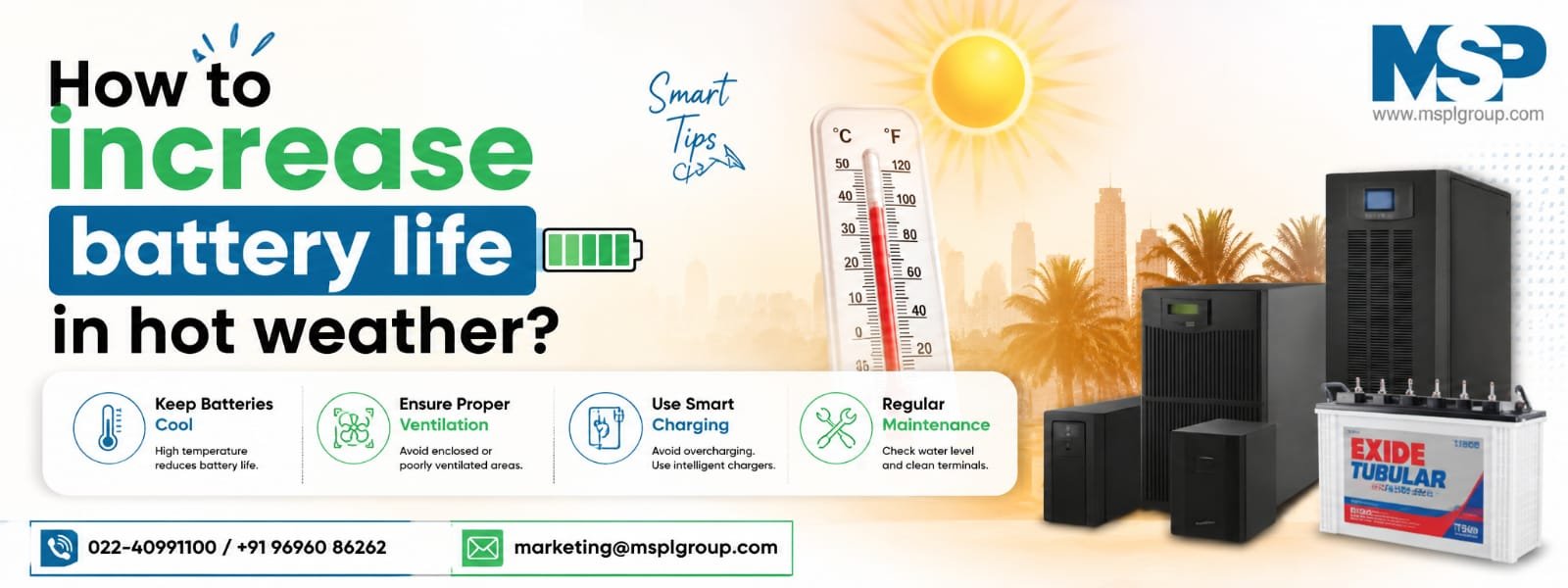
The single most effective way to increase battery life is maintaining a controlled environment.
Install batteries in well-ventilated rooms where temperatures remain between 20°C and 25°C whenever possible.
For data centers and industrial facilities, dedicated cooling systems help maintain consistent battery performance throughout the year.
Best Practice
Monitor room temperature continuously.
Avoid placing batteries near heat-generating equipment.
Maintain consistent airflow around battery racks.
Poor ventilation traps heat around batteries, increasing internal temperatures.
Install adequate exhaust fans, ventilation ducts, or HVAC systems to remove accumulated heat.
Routine inspections help identify problems before they become expensive failures.
During inspections, check for:
Swelling
Cracks
Loose terminals
Corrosion
Electrolyte leaks
Dust accumulation
Battery temperature
Charging voltage
Professional preventive maintenance significantly improves battery reliability.
Dust acts as an insulating layer that traps heat.
Clean battery terminals regularly using recommended cleaning materials and inspect for corrosion.
Never use excessive water or harsh chemicals on battery connections.
A clean battery operates cooler and charges more efficiently.
Overcharging generates excessive internal heat and accelerates battery aging.
Modern UPS systems include intelligent charging technology, but periodic charger calibration is still recommended.
Ensure charging voltages follow manufacturer specifications.
Using compatible chargers is essential for both VRLA and lithium batteries.
Many modern UPS systems include intelligent battery monitoring that tracks:
Temperature
Voltage
Internal resistance
Charging cycles
Battery capacity
Remaining lifespan
Real-time monitoring enables maintenance teams to identify weak batteries before they fail, reducing the risk of unexpected downtime.
For industrial UPS installations, integrating battery monitoring into a Building Management System (BMS) or Data Center Infrastructure Management (DCIM) platform provides continuous visibility into battery performance and helps optimize preventive maintenance schedules.
Allowing your UPS or inverter battery to discharge completely on a regular basis significantly reduces its lifespan. Deep discharges put additional stress on the battery plates, making it harder for the battery to recover its full capacity.
Best Practices:
Recharge batteries as soon as power is restored.
Configure UPS systems with appropriate low-battery shutdown settings.
Avoid using batteries until they are completely drained unless recommended by the manufacturer.
Benefit: Longer battery lifespan and improved backup performance.
Loose or corroded battery terminals increase electrical resistance, generating excess heat during charging and discharging. Over time, this can reduce efficiency and create potential safety risks.
Inspection Checklist:
Tighten all terminal connections.
Remove corrosion using approved cleaning solutions.
Replace damaged connectors immediately.
Inspect cables for wear, cracks, or overheating.
Proper electrical connections improve charging efficiency and reduce unnecessary heat buildup.
Every battery has a limited service life. Waiting until complete failure can result in costly downtime, equipment shutdowns, and emergency replacements.
Typical battery lifespan:
| Battery Type | Average Service Life |
| VRLA Battery | 3–5 years |
| Flooded Lead-Acid | 5–10 years |
| Lithium-Ion Battery | 8–15 years |
Environmental conditions, charging quality, and maintenance practices can significantly influence these estimates.
Professional battery health testing helps identify weak batteries before they become a critical problem.
Using incompatible chargers may cause:
Overcharging
Undercharging
Excessive heat generation
Reduced battery capacity
Premature battery failure
Always use charging equipment approved by the UPS or battery manufacturer. Smart chargers automatically adjust charging voltage based on battery condition and temperature.
Preventive maintenance is one of the most effective ways to maximize battery life and minimize unexpected failures.
A professional maintenance program typically includes:
Battery impedance testing
Capacity testing
Thermal inspections
Charger calibration
Terminal cleaning
Torque verification
Load testing
Environmental assessment
For industrial facilities and data centers, preventive maintenance should be scheduled at least twice a year, with more frequent inspections in regions experiencing prolonged high temperatures.
Modern battery monitoring systems provide continuous insights into battery performance, helping maintenance teams detect problems early.
A battery monitoring solution can track:
Battery temperature
Charging voltage
Current flow
Internal resistance
Remaining capacity
Cell imbalance
Historical performance trends
These systems enable predictive maintenance, reducing downtime and extending battery life.
Many battery failures are preventable. Avoid these common mistakes to keep your UPS and inverter batteries performing reliably.
❌ Installing Batteries in Hot Rooms
High ambient temperatures accelerate battery aging. Always install batteries in well-ventilated, temperature-controlled environments.
❌ Blocking Airflow
Stacking equipment too closely or placing batteries near walls can restrict airflow, causing localized overheating.
❌ Ignoring Warning Alarms
UPS battery alarms often indicate developing issues. Delaying inspection can result in sudden battery failure.
❌ Skipping Preventive Maintenance
Neglecting routine inspections allows corrosion, loose connections, and weak batteries to go unnoticed until failure occurs.
❌ Mixing Old and New Batteries
Replacing only part of a battery bank creates imbalance, reducing overall system performance and shortening battery life.
❌ Overloading the UPS
Operating a UPS beyond its rated capacity increases battery discharge rates and internal temperatures.
❌ Using Poor-Quality Replacement Batteries
Low-quality batteries may cost less initially but often provide shorter service life, lower reliability, and inconsistent performance.
Which Battery Performs Better?
For most commercial and industrial applications, lithium-ion batteries offer better thermal performance, longer lifespan, faster charging, and lower maintenance requirements. However, VRLA batteries remain a cost-effective choice for many UPS installations when properly maintained and operated within recommended temperature ranges.
Use the following checklist regularly to improve battery performance and extend service life.
Daily
*Monitor UPS alarms.
*Check battery room temperature.
*Verify ventilation is unobstructed.
Weekly
*Inspect for unusual battery swelling.
*Check charging status.
**Look for signs of overheating.
Monthly
*Clean battery terminals.
*Remove dust and debris.
*Inspect cables and connectors.
*Verify charger operation.
Quarterly
*Measure battery voltage.
*Check internal resistance.
*Inspect battery racks.
*Review monitoring system reports.
Every Six Months
*Conduct professional battery health testing.
*Perform load testing.
*Tighten electrical connections.
*Calibrate charging equipment.
Annually
*Complete preventive maintenance inspection.
*Evaluate battery capacity.
*Replace weak or aging batteries.
*Review environmental conditions and cooling systems.
High temperatures accelerate the chemical reactions inside batteries, causing faster degradation of internal components. As a result, batteries lose capacity more quickly, provide shorter backup times, and require replacement sooner than batteries operating within the recommended temperature range.
Most VRLA UPS batteries perform best between 20°C and 25°C (68°F–77°F). Maintaining this temperature range helps maximize battery lifespan, improve charging efficiency, and ensure reliable backup during power outages.
Yes. Prolonged exposure to excessive heat can cause permanent damage, including plate corrosion, electrolyte loss, swelling, reduced capacity, and in severe cases, thermal runaway. Once significant heat damage occurs, battery performance cannot usually be fully restored.
Higher temperatures increase battery aging and internal resistance. Heat also accelerates self-discharge, reducing the battery’s ability to store energy. This often results in noticeably shorter backup times during summer months.
Commercial and industrial UPS batteries should be visually inspected every month and professionally tested at least every six months. High-temperature environments may require more frequent inspections to detect early signs of deterioration.
For critical applications such as data centers, hospitals, manufacturing plants, and server rooms, installing batteries in temperature-controlled rooms is highly recommended. Proper cooling helps extend battery life and maintain reliable performance.
Lithium-ion batteries generally perform better than VRLA batteries in elevated temperatures. They offer longer lifespan, better charging efficiency, lower maintenance requirements, and improved thermal stability when properly managed.
Yes. Overcharging generates excess heat, accelerates battery aging, and can permanently reduce battery capacity. Always use manufacturer-approved chargers with intelligent charging controls to prevent overcharging.
Hot weather is one of the leading causes of premature battery failure, reduced backup time, and increased maintenance costs. Whether you rely on a UPS system for your business, an inverter for your home, or industrial power backup for mission-critical operations, protecting your batteries from excessive heat is essential for long-term performance.
By maintaining the recommended operating temperature, ensuring proper ventilation, avoiding overcharging, performing regular inspections, and following a preventive maintenance schedule, you can significantly extend battery lifespan and improve system reliability. Investing in battery monitoring and professional health checks also helps detect potential issues before they lead to unexpected failures or costly downtime.
Choosing the right battery technology—whether VRLA or lithium-ion—and operating it under optimal conditions ensures better efficiency, lower replacement costs, and uninterrupted power when you need it most.
Remember, proactive battery care is far more cost-effective than emergency replacements. A well-maintained battery not only delivers consistent backup during power outages but also protects valuable equipment, supports business continuity, and provides peace of mind throughout the hottest months of the year.
Don't wait for battery failure to disrupt your operations. At MSPL Group, we specialize in comprehensive power backup solutions designed to maximize battery performance and ensure uninterrupted operations.
Our Services Include:
Whether you operate a manufacturing plant, data center, hospital, commercial building, or office, our experienced engineers provide reliable solutions tailored to your power protection needs.
Contact MSPL Group today to schedule a professional battery health assessment and ensure your UPS and inverter systems are ready to perform—even during the hottest days of the year.

Your email address will not be published.

Comments